


This page was last revised for version 5.1.0.
Curation Assistant
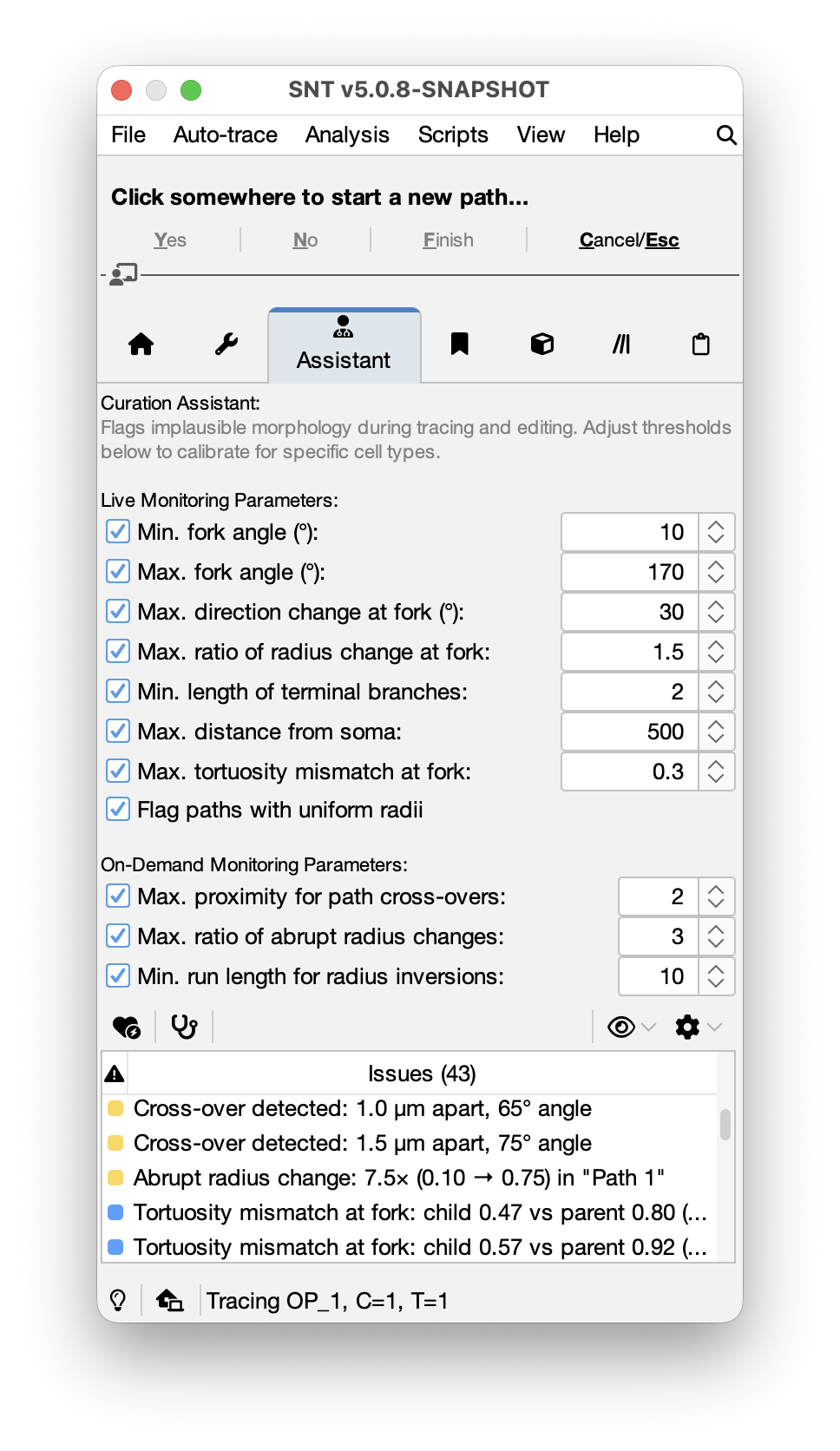
The Curation Assistant monitors the morphological plausibility of neuron reconstructions in real time (see Curation vs Proofreading). It flags suspect tracing operations as they happen, e.g., near-parallel fork angles, abrupt thickness changes, U-turns at branch points, and so on. It also provides an on-demand “full scan” that detects whole-reconstruction issues such as crossovers, bundled paths, and locations along the tracing where the image’s signal-to-noise ratio degrades significantly.
All parameters can be adjusted in the GUI, saved to reusable preset files, or calibrated automatically from reference reconstructions. Importantly, all detected issues are tagged with an estimated impact on the overall correctness of the reconstruction.
The Assistant panel is organized into four regions:
- Live Monitoring Parameters: Lightweight checks that run inline during interactive tracing (at fork initiation, segment completion, path finalization, and node editing)
- On-Demand Monitoring Parameters: More computationally intensive checks that scan the full reconstruction when explicitly triggered
- Toolbar: Action buttons and options for calibration and presets
- Issues Table: Displays current issues sorted by severity and/or impact. Double-click a row to navigate to the warning location in the image
Live Monitoring Parameters
These checks execute in sub-millisecond time and are evaluated automatically during tracing when live monitoring is enabled. Each check has a checkbox to enable or disable it and a field (where applicable) to set its threshold:
Fork angle: min (°)
Warns when the angle between a path and its parent branch is suspiciously narrow, suggesting the child runs nearly parallel to the parent. The angle is computed from the parent’s direction at the branch point and the child’s initial heading (first 5 nodes).
Default: Enabled | Severity level: Warning | Range: 0–90° |
Fork angle: max (°)
Warns when the fork angle is too wide, as when the child branch nearly doubles back on the parent, which is anatomically rare and often indicates a tracing error.
Default: Enabled | Severity level: Warning | Range: 90–180° |
Fork angle: min and Fork angle: max control the same Branch angle check. The check is enabled whenever at least one of the two checkboxes is selected.
Fork direction flow: max change (°)
Detects potential U-turns where a child path reverses the parent’s trajectory.
The check compares the parent’s tangent vector at the branch point with the child path’s initial direction vector (first 5 nodes). When the angle between the two vectors falls below this threshold, it suggests the child is continuing backward along the parent rather than branching away from it.
Default: Enabled | Severity level: Either Warning or Error (depending on angle) | Range: 0–90° |
Tortuosity: max mismatch at fork
Warns when a child path has a markedly different straightness from its parent, measured by contraction.
The absolute difference in contraction between parent and child is compared against this threshold.
Both paths must have at least 5 nodes for the check to apply.
Default: Enabled | Severity level: Advisory note | Range: 0.05–1.0 |
Radius continuity: max ratio at fork
Flags branch points where the child neurite’s caliber differs sharply from the parent’s at the fork.
The parent radius is sampled at the branch node; the child radius is the median of its first 5 nodes.
The ratio \(\frac{child\,radius}{parent\,radius}\) is compared against this threshold.
Default: Enabled | Severity level: Either Warning or Error (depending on ratio) | Range: 1.0–10.0 |
Inter-fork distance: min
Flags consecutive bifurcations that sit suspiciously close to each other in quick succession. Short inter-fork segments are biologically plausible in some cells (e.g., dendrites of Drosophila c3da neurons) but they are also a classic signature of mis-anchored child paths and accidental fork points.
The distance is measured along the parent path between the parent’s branch node and the next downstream fork on the focus child.
Default: Enabled | Severity level: Warning | Range: 0.5–1000.0 (in image units) |
Terminal paths: min length
Catches terminal stubs that are too short to be anatomically meaningful, in case they were generated by accidental clicks or tracing artifacts.
Only terminal paths are evaluated. A terminal path whose length (in image units) falls below this threshold is flagged.
Default: Enabled | Severity level: Advisory note | Range: 0.1–100.0 (in image units) |
Uniform thickness: flag
Identifies paths where every node shares the same radius value, which typically means radii remain at a default constant.
Default: Enabled | Severity level: Advisory note | This check has no threshold field: it is either enabled or disabled. |
On-Demand Monitoring Parameters
These checks scan the full set of paths currently traced. They are triggered by clicking the Run Full Scan button.
Cross-over detection: max proximity
Detects crossovers: regions where two or more paths pass very close to each other, warranting a closer inspection, to ensure the tracings reflect the accurate topology at that location. This max. proximity is the proximity radius described in CrossoverFinder’s algorithm. Direct parent-child pairs are excluded from this check.
Default: Enabled | Severity level: Warning | Range: 0.1–100.0 (in image units) |
Bundle detection: max angle (°)
Flags pairs of paths that run nearly parallel and remain mutually close over a sustained distance (e.g., the pattern produced by axons projecting along the same nerve). Such locations warrant inspection to ensure the signal from the neighboring neurite does not hijack the tracings.
Default: Disabled | Severity level: Advisory note | Range: 0–90° |
Missed-fork candidate: max proximity
Catches a common tracing pattern where two paths that should have shared a branch point are instead traced independently from nearby start points. Specifically, this flags terminal paths whose endpoint sits suspiciously close to a node on a non-ancestor path: i.e., the terminal “ends” right next to the path it should have forked off of.
Default: Enabled | Severity level: Advisory note | Range: 0.1–50.0 (in image units) |
Z-extent: min ratio
Flags paths that are nearly flat in Z relative to their total length. A non-zero Z extent is expected for non-planar 3D neurites of meaningful length; an unexpectedly low value can signal segmentation collapsed onto a single plane, or slice-by-slice tracing that lost continuity in Z.
The ratio is \(\frac{z_{\max} - z_{\min}}{\text{path length}}\).
Default: Disabled. Ignored for 2D datasets | Severity level: Advisory note | Range: 0.001–1.0 |
Thickness jumps: max ratio
Finds adjacent nodes within a single path that have a sudden change in radius. This could result from e.g., radius-fitting errors.
The ratio \(\frac{\max(r_1, r_2)}{\min(r_1, r_2)}\) between consecutive nodes is compared against this threshold.
Default: Enabled | Severity level: Warning | Range: 1.5–20.0 |
Thickness inversions: min run length
Flags sustained centripetal radius increases along a path. Since neurites generally taper as they extend away from the soma, a long run of increasing radii suggests an error.
A “run” is a consecutive sequence of nodes where each radius exceeds the previous. When a run’s length meets or exceeds this threshold, a warning is produced.
Default: Enabled | Severity level: Advisory note | Range: 3–100 (no. of nodes) |
Invalid thickness: flag
Identifies paths containing nodes with zero, negative, or NaN radius, which typically occurs from un-fitted nodes, upon path refinement.
Default: Enabled | Severity level: Warning | This check has no threshold field: it is either enabled or disabled
Path signal quality: min contrast
Measures how well each path stands out from the background in the image. At every node (excluding the first and last), a perpendicular cross-section is sampled using a Bresenham line that extends 3× the path radius (minimum 5 px) on each side. The sampled intensities are split by percentile: the lower quartile (P25) estimates background, the upper quartile (P75) estimates signal. The contrast ratio is defined as:
\[\frac{\mathrm{median}(\text{signal}) + 1}{\mathrm{median}(\text{background}) + 1}\]A path whose median contrast ratio falls below this threshold is flagged. The +1 offset prevents division by zero and stabilizes the ratio for dim images. When set to -1 (Auto), the threshold is computed automatically from the image’s intensity range as \(\frac{I_{\max} + 1}{I_{\min} + 1} \times \frac{1}{2}\), representing half of the best achievable contrast ratio for the image. The computed value is displayed in the spinner after the scan completes; use the undo button to reset to auto mode. This check requires an image to be loaded and image statistics to be computed.
Default: Enabled (auto-threshold) | Severity level: Warning | Range: -1 (auto) or 1.0–100.0 |
Tip signal quality: min contrast
A tip-restricted variant of the signal-contrast check above. Flags terminal paths whose final few nodes have low signal/background contrast: the pattern that produces “uncertain” terminals where the neurite has faded into the background before tracing stopped, so the tip’s spatial location is ambiguous.
Uses the same contrast machinery as Path signal quality: min contrast but restricted to the last few nodes of each terminal (tail-window size is configurable in scripts). Naturally tapering endings with bright signal score high contrast; tips that fade into noise score low.
When set to -1 (Auto), the threshold is adopted from Path signal quality: min contrast’s resolved value if that check is enabled; otherwise it is derived from the image statistics using the same formula. Use the undo button to reset to auto mode.
Default: Enabled (auto-threshold) | Severity level: Advisory note | Range: -1 (auto) or 1.0–100.0 |
Path signal quality dips: min drop
Flags localized intensity drops along a path: a few-node drop in brightness flanked by bright signal on both sides. Catches nodes that pass through ambiguous regions where the trace’s exact position is suspect (e.g., en-passant neurites crossing a dim region, traced contiguously instead of branching off the underlying neurite).
For each path, the per-node intensity profile is scanned with a prominence-based local-minimum detector. The reported “signal drop” is the dip’s depth below the path’s brightest node, as a fraction of that maximum.
Default: Disabled | Severity level: Advisory note | Range: 0.05–1.0 |
Toolbar Actions
Live Monitoring Toggle
Enables or disables real-time plausibility checking during interactive tracing. When enabled, the assistant hooks into fork initiation, segment completion, path finalization, and node editing events, running all enabled live checks automatically.
Run Full Scan
Triggers a comprehensive scan of all paths in the current reconstruction using both live and on-demand parameters. Live checks are applied to every parent–child fork relationship; on-demand checks scan the path collection as a whole. Results are displayed in the issues table.
Filter & Sort
A dropdown with two sections:
- Show: Checkboxes for each severity level (Errors, Warnings, Advisory Notes) controlling which categories appear in the table
- Sort: A Sort by Impact (descending) toggle that orders the issues by impact fraction, highest first. Useful for triage when you want consequential issues at the top. Clicking a column header manually overrides it until re-enabled
Utilities Menu
A dropdown listing commands listing conveninence actions:
-
Visiting Zoom Level ›: Configures the zoom applied when double-clicking a warning to navigate.
-
Color Paths by Issue Severity: For each issue, color codes affected paths by severity: Error, Warning, or Advisory Note
-
Seed Reviews:
- Mark Affected Path(s) As ›: Tags the path(s) referenced by the selected warning(s) as positive, negative, or follow-up examples for seed-review workflows
- Show Reviewed Paths in Path Manager: Switches focus to the Path Manager and filters its list to paths carrying any
cur:*review tag.
Calibration Menu
A dropdown listing commands for parameter calibration: from existing reconstructions, built-in, or user presets.
Issues Table
The table has three columns:
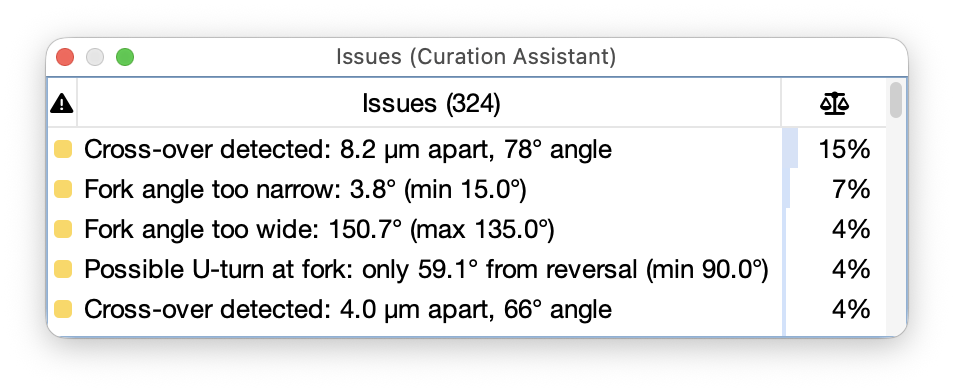
- Severity: Color-coded icon (Error, Warning, Advisory Note). Click the header to sort
- Issue: Description of the flagged condition
- Impact: How much of the reconstruction is at stake if the flag turns out to be a true tracing error (see Understanding Impact). Displayed as a percentage, or “—” for checks whose impact metric is not applicable
Default order is by severity descending (Errors → Warnings → Advisory Notes). Click any column header to re-sort, or use the Sort by Impact toggle in the Filter menu to triage by structural consequence.
Double-click a row to navigate to the warning’s spatial location in the image. The view centers on the affected node and zooms to the configured visiting zoom level (table’s contextual menu).
Right-click the table for:
- Copy Issue Description: Copies selected issues (or all rows when nothing is selected) to the clipboard as tab-separated text including severity, message, and affected path names
- Help on Issue…: Opens this documentation page anchored to the section describing the selected check
- Clear All Issues: Empties the table
- Detach Table: Pops the issues table out into a separate floating window so it can be docked elsewhere or kept visible while the main panel is used for other tasks.
Understanding Impact
Impact is a normalized fraction in [0, 1] representing what portion of the reconstruction is at stake if the flag turns out to be a true tracing error. It is independent of severity: severity says how confident the check is that something is wrong; impact says if it is wrong, how much damage. A high-severity Error on a terminal stub may be less urgent than a Warning on a primary trunk.
Two propagation models are used internally:
-
Topology-class checks (fork angle, fork direction flow, tortuosity, cross-over detection, bundle detection): The impact is measured as the length of the subtree rooted at the flagged path divided by total tree length. Topology errors cascade to descendants, so the entire subtree is at risk.
-
Local checks (radius continuity, thickness jumps, thickness inversions, terminal path length, inter-fork distance, missed-fork candidate, Z-extent, path signal quality, tip signal quality, path signal quality dips): The impact is measured as the length of the flagged path divided by total tree length. These errors stay contained.
For fork-point warnings involving both a parent and child path, the child is the focus of the impact calculation: these checks evaluate the child’s plausibility at the fork, so the child’s subtree (not the parent’s) is considered. Two special display values:
<1%: a small but measurable impact (below 0.5%). Reserved for checks where the affected path or subtree is a tiny fraction of the tree—(em-dash): the impact metric is not applicable for this check. E.g., the uniform thickness flag falls in this category, since it signals incomplete radius-fitting rather than a morphological error
Calibrating Parameters
A striking feature of the Curation Assistant is that the threshold of each validation parameter can be calibrated with fine granularity using known ground-truth data from multiple sources: existing files, built-in presets, or user presets. It is also possible to fine-tune thresholds by inspecting the distributions of traced paths.
Calibrating Thresholds from Traced Cells
Calibrates the Assistant from existing reconstructions. Available via the Utilities Menu, Calibrate Thresholds from Traced Cells…: the command opens a file chooser for selecting reconstruction files. The selected cells are loaded, and all thresholds are inferred from their morphological statistics using percentile analysis (5th percentile for lower-bound thresholds, 95th percentile for upper-bound). The calibrated values are applied to the panel immediately. See Advanced Curation Tasks for details on the underlying algorithm.
Built-in Presets
Calibrates the Assistant from NeuroMorpho reference data and provides sensible starting points for common cell types. Available via the Utilities Menu Built-in Presets list: Selecting a preset loads its thresholds and enabled states into the panel. Presets include:
| Preset | Cell type | Species | Publication(s) | NeuroMorpho archive |
|---|---|---|---|---|
| CA1 Dendrites | CA1 pyramidal (basal + apical dendrites) | Mouse | Mellström et al., 2016 | DeFelipe |
| CA3 Dendrites | CA3 pyramidal (basal + apical dendrites) | Rat | Ishizuka et al., 1995 | Amaral |
| Eurydendroid Cells | Eurydendroid | Larval zebrafish | Kunst et al., 2019 | Baier |
| Kenyon Cells | Kenyon | Adult Drosophila | Zheng et al., 2018 | Bock |
| Martinotti Cells | Martinotti interneuron (axons/dendrites) | Mouse | Goldberg et al., 2004, Trevelyan et al., 2006, Nikolenko et al., 2007 | Yuste |
| Purkinje Dendrites | Purkinje neuron (dendrites) | Mouse | Chen et al., 2013 | Dusart |
| RGC Dendrites | Retinal ganglion cell (dendrites) | Mouse | Werginz et al., 2020 | Fried |
NB: Since imagery is not available from NeuroMorpho.org, these calibrations do not set explicit thresholds for signal quality ratios
User Presets
Calibrates the Assistant from your own data. Available via the Calibration Menu User Presets list, automatically populated from preset files (.curation extension) found in the curations/ subdirectory of the SNT workspace (typically ~/SNT_workspace/curations/). This section of the menu also includes commands to manage presets:
- Create From Current Parameters… Saves the current thresholds and enabled states to a new
.curationfile (described here). - Reload User Presets: Rescans the curations directory and refreshes the menu
- Reveal User Presets Directory: Opens the curations directory in the system file manager
Distribution Inspection
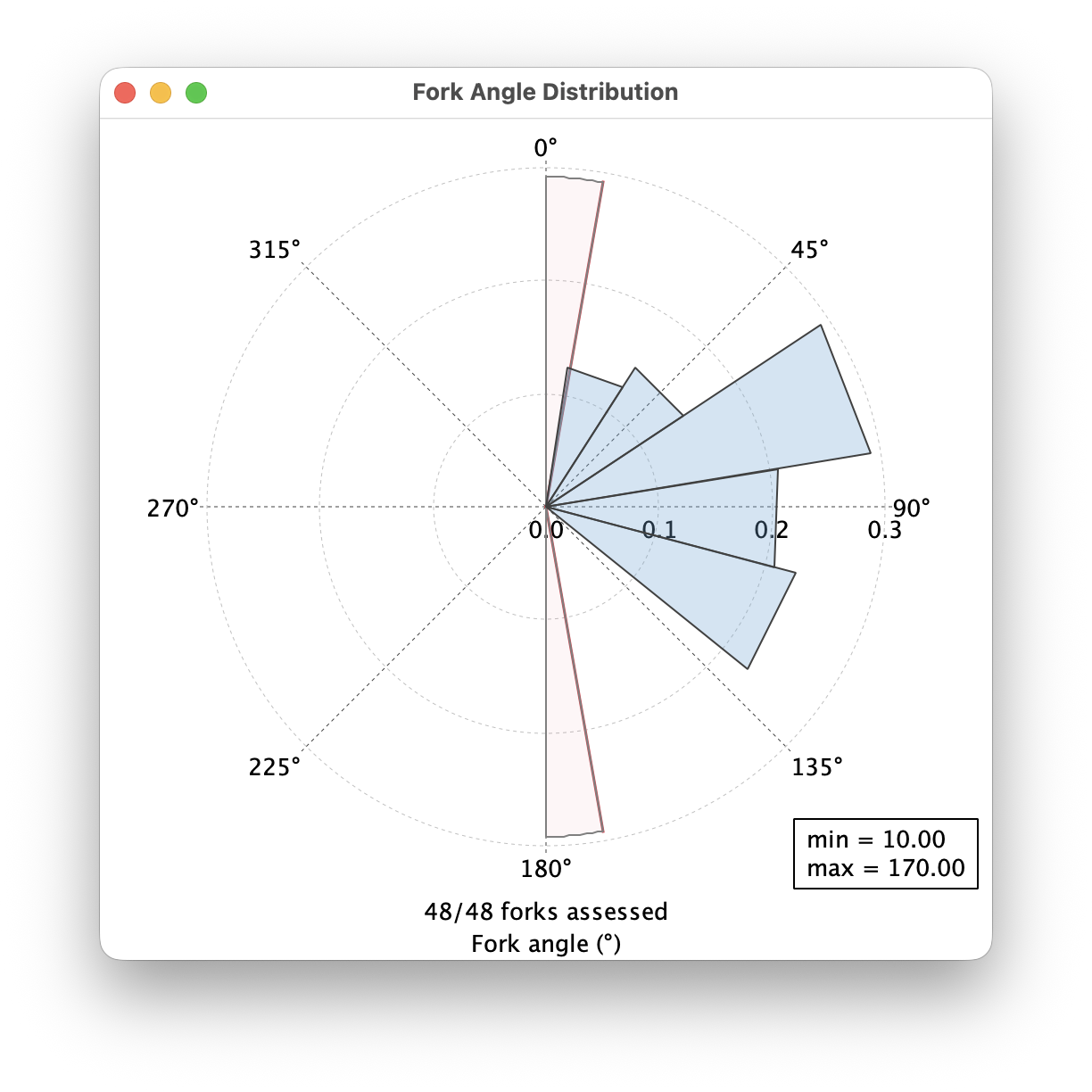
Allows you to calibrate the Assistant from all the paths currently listed in the Path Manager. Next to each parameter spinner is a small histogram button. Clicking it opens a popup showing the distribution of the corresponding metric across the current reconstruction, with:
- Quartile markers (Q1, median, Q3) and a descriptive subtitle reporting n, min, max, mean, and SD
- A threshold line at the configured spinner value, with the flagged region lightly shaded
- A footer reporting how many units could be evaluated and how many were skipped (e.g., 220/258 forks assessed)
- For angle-related checks (Fork angle, Fork direction flow), a polar plot rather than a Cartesian one
The distribution allows you to gauge suitable thresholds for your own data, using what you have traced so far. E.g., consider the distribution on the right obtained for a particular cell with 48 branch points: as you can see, all the forking angles lie between 10° and 135°, with the current min/max thresholds set to 10° and 170°. As such, reducing Fork angle: max (°) to 135° would increase the detection sensitivity for subsequent tracings of similar properties.

Histograms are diagnostic aids that can help you decide whether a threshold sits in a sensible region of your data’s actual distribution. They do not certify a reconstruction’s correctness: A clean distribution with nothing past the threshold only means the configured check found nothing to flag, not that the reconstruction is accurate.
Seed-based Reviews
The Curation Assistant also accepts warnings contributed by external programs: Warnings produced outside SNT can be imported as Warning seeds, and loaded into the assistant. These entries:
- Carry the check name “Seed Review” so they’re easier to spot (and filter) among the algorithmically-generated warnings
- Use the seed’s 3D position as the warning location, so the standard double-click-to-navigate behavior flies the canvas to the seed
- Their severity level (Advisory Note / Warning / Error) is manually chosen: use whichever level matches the review intent
- Encode the seed’s confidence, type, and source in the message
A typical workflow:
- Import seeds into the Seeded Tracing Assistant (e.g., a CSV file of predicted problematic locations generated by a deep-learning pipeline)
- Adjust the confidence range and sort the table so the candidates of interest are at the top
- Select the rows to be reviewed, right-click, and choose Send Selected Seeds to Curation Assistant… → As Warning (or As Advisory Note / As Error, as appropriate)
- The action will import the selected seeds and switch to the Assistant tab; step through the new entries via double-click navigation
NB: Imported seeds are not de-duplicated: sending the same selection twice produces two rows
Detecting Crossovers
A crossover is a spot where at least two neurites pass very close to each other in space (so they may look like they intersect in the image) without being topologically connected. Identification of crossover sites is thus useful to disambiguate overlaps between neurites and spot possible tracing mistakes, such as missed branch-points or false merges.
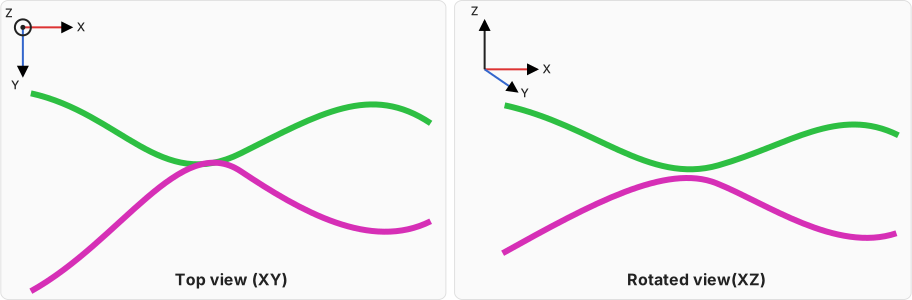
Overview of a crossover between two neurites.
Left: Seen from top, the two neurites appear to intersect. Right: rotation to front view reveals that the two paths are juxtaposed in the XZ plane.
Algorithm
Crossover events between two paths, Path A and Path B, are detected as follows:
- Seeds:
All tracing nodes from both paths plus segment midpoints are used as seed points (midpoints help catch “T-like” geometries where a node lies near the middle of another path’s segment). Midpoints are flagged so they can be treated specially later - Proximity mining:
A uniform 3D grid is built with cell size equal to the proximity radius. For each seed, the 27-cell neighborhood (the seed’s cell ± 1 in x/y/z) is queried; candidate pairs are kept if their Euclidean distance ≤ proximity and they satisfy a series of optional criteria - Candidate grouping:
Candidate pairs are grouped by unordered (Path A, Path B) pairs, then sorted by index (iA, iB) and deduplicated. Each group is split into monotonic “runs”. A run is accepted if its length is within a specified cutoff, or if it is a single-pair run that touches an endpoint - Geometric verification:
For each accepted run, all corresponding segment pairs are examined: the closest points and distances between segments are computed, as well as an orientation-invariant approach angle (0–90°) from local tangents. The center of the crossover event is the mean of closest-point midpoints; the median distance and median angle summarize the run. Optional angle thresholds can be applied - Merging:
Nearby events (centers within proximity) are merged: the center is averaged, participants are unioned, index windows are merged, the distance becomes the minimum of medians, and the angle becomes the mean of medians - Validation:
A final post hoc filter keeps an event only if at least one path node from a participant path is near the event center. This removes spurious “floating” events
Obtaining Crossover Locations
From the GUI, the easiest way to list crossover events is to use the Bookmark option in the Navigator Toolbar. Alternatively, running the curation assistant’s full scan will also run the detection routine. For advanced detections, scripting is advised. In a script, detection settings are specified in a Config object, example:
// groovy
import sc.fiji.snt.util.CrossoverFinder

cfg = new CrossoverFinder.Config()
    .proximity(2.0) // Neighborhood radius [real-world units (e.g., µm)] used 1) for the coarse grid query during candidate mining, and 2) to merge nearby events
    .thetaMinDeg(0.0) // Minimum approach angle (0–90°) required to accept an event. Use 10–20° to suppress nearly parallel neurites
    .minRunNodes(2) // Minimum length of a "near-pair run". Neurites need to have at least this no. of nodes at the crossover site for it to be detected
    .sameCTOnly(true) // Only compare paths with the same channel and frame?
    .includeSelfCrossovers(false) // Allow detections within the same neurite? Generally keep false
    .includeDirectChildren(false) // Allow detections within a path and its direct child? Generally keep false
    .nodeWitnessRadius(-1.0) // Post hoc filter: a crossover event is only kept if at least one participant path has an actual node (not a midpoint) within this radius of the event center. Default (-1) defers to the proximity value
Once the config is defined, events can be detected from any collection of paths:
// groovy
import sc.fiji.snt.Tree

tree = Tree.fromFile("path/to/a/swc/file.swc")
paths = tree.list()

events = CrossoverFinder.find(paths, cfg)
for (ev in events) {
    println("x=%.2fµm, y=%.2fµm, z=%.2fµm, angle=%.1f°, d=%.2fµm, paths=%d%n",
        ev.x, ev.y, ev.z, ev.medianAngleDeg, ev.medianMinDist, ev.participants.size())
    xyzct = ev.xyzct() // pixel-space + avg C/T
    // Optional: create a bookmark or navigate to xyzct[0..2]
}
Detecting Bundles
“Bundles” are regions where two or more paths run parallel to each other for a sustained distance. Typically,
these occur with axons projecting along the same nerve, or a neurite whose tracing inadvertently ‘jumped’ to a neighbor neurite running side-by-side. These are detected by the same crossover detection algorithm, but by inverting its angle filter, so that instead of catching brief perpendicular near-crossings, it catches low-angle approaches tuned for sustained runs. The underlying detector—BundleDetector—shares the same API as CrossoverFinder, and is scripted in the same way.
Advanced Curation Tasks
Running Checks Programmatically
All curation classes live in the sc.fiji.snt.analysis.curation package. The three main entry points are:
PlausibilityCheckThe checks themselvesPlausibilityMonitorThe runtime coordinator, managing both tiers of checksPlausibilityCalibratorThreshold inference and preset I/O
A typical usage in a script would look like this:
import sc.fiji.snt.Tree
import sc.fiji.snt.analysis.curation.PlausibilityMonitor
import sc.fiji.snt.analysis.curation.PlausibilityCheck

// Load a reconstruction
tree = Tree.fromFile("/path/to/cell.swc")

// Create and configure the monitor
monitor = new PlausibilityMonitor()

// Adjust individual check thresholds
ba = monitor.getLiveCheck(PlausibilityCheck.BranchAngle.class)
ba.setMinAngleDeg(15.0)
ba.setMaxAngleDeg(90.0)

rj = monitor.getDeepCheck(PlausibilityCheck.RadiusJumps.class)
rj.setMaxJumpRatio(2.0)

// Run a full scan (live + on-demand checks on all paths)
warnings = monitor.runFullScan(tree.list())
warnings.each { w ->
    println("${w.severity()}: ${w.message()}")
}
Calibrating Thresholds Programmatically
From Local Files
PlausibilityCalibrator infers thresholds from reference reconstructions. For each parameter, it collects the relevant metric across all parent–child forks (live checks) or all paths (deep checks) and derives a threshold from percentile statistics.
Lower-bound parameters (e.g., minimum fork angle) use a lower percentile; upper-bound parameters (e.g., maximum radius ratio) use an upper percentile.
import sc.fiji.snt.Tree
import sc.fiji.snt.analysis.curation.PlausibilityCalibrator
import sc.fiji.snt.analysis.curation.PlausibilityMonitor

// Load reference cells
trees = [
    Tree.fromFile("/path/to/cell1.swc"),
    Tree.fromFile("/path/to/cell2.swc"),
    Tree.fromFile("/path/to/cell3.swc"),
]

// Calibrate
calibrator = new PlausibilityCalibrator(trees)
calibrator.setUpperPercentile(95.0) // default
calibrator.setLowerPercentile(5.0)  // default
result = calibrator.calibrate()

// Print the summary table: A formatted summary showing each check's
// inferred threshold, sample size, mean, sd, and the percentile used
println(result.toTable())

// Apply to a monitor
monitor = new PlausibilityMonitor()
result.applyTo(monitor)
From NeuroMorpho.org
SNT includes a script template (Tracing › Calibrate Curation From NeuroMorpho…) that downloads reference cells by their NeuroMorpho.org identifiers, calibrates thresholds, and saves a .curation preset.
The template accepts parameters for the preset name, a comment, and the upper/lower percentiles. Edit the cellIds list in the script body with identifiers for your cell type of interest.
Saving and Loading Curation Presets Programatically
Presets can be saved and loaded programmatically:
import sc.fiji.snt.analysis.curation.PlausibilityCalibrator
import sc.fiji.snt.analysis.curation.PlausibilityMonitor

monitor = new PlausibilityMonitor()
// ... configure monitor thresholds ...

// Save to a .curation file
outFile = new File("/path/to/my-preset.curation")
PlausibilityCalibrator.save(monitor, outFile, "My custom preset")

// Load from a .curation file
PlausibilityCalibrator.load(outFile, monitor)

// Load a built-in preset bundled with SNT
PlausibilityCalibrator.loadBuiltIn("dummy1", monitor)
Scripting-Only Checks
Further plausibility checks are possible via scripting and can be enabled via a preset file or directly from a script. Here are some examples:
Max. distance from soma/root
Flags paths whose starting node is unexpectedly far from the reconstruction’s origin. When the reconstruction has a soma-tagged path, the Euclidean distance from each path’s first node to the nearest soma node is measured; otherwise distances are taken from the tree’s root:
sd = monitor.getLiveCheck(PlausibilityCheck.SomaDistance.class)
sd.setEnabled(true)
sd.setMaxDistUm(500.0)
Min. distance from image boundary
Flags terminal endpoints that lie suspiciously close to the image’s edge, i.e., possibly extending beyond the field-of-view (FOV). Requires a loaded image so the FOV dimensions can be queried:
import net.imglib2.img.display.imagej.ImageJFunctions

bp = monitor.getDeepCheck(PlausibilityCheck.BoundaryProximity.class)
bp.setEnabled(true)
bp.setMinVoxelsFromBoundary(1.0)
// setImage() takes a RandomAccessibleInterval; wrap ImagePlus / Dataset as needed.
bp.setImage(ImageJFunctions.wrap(imp))