

This tool allows to perform single-trajectory analysis of the input experiments. Every tab has a side Experiments panel where each experiment can be toggled on/off and, where relevant, restricted to the 2D, X, or Y component.

Saving data. Every tab has a Save plot button that exports its plot as a vector image (svg), which you can edit in tools such as Inkscape or Illustrator. The Diffusion coefficient, Anomalous exponent, Diffusion Model, Turning Angles and PSD tabs also save their values as a csv file for further analysis (Save D…, Save α…, Save models…, Save angles… and Save PSD…). Their first columns are experiment and, for per-trajectory values, track_id; commas in experiment names are written as semicolons. In D vs α, tagged populations can be saved as trajectory files (see Population tagging).
Units. The Units button of the tMSD Visualization, Diffusion coefficient, D vs α and PSD tabs opens a window to choose the time (frames, ns, μs, ms, s) and space (nm, μm, mm, m) units of the plots and csv exports, whose column headers name them. Physical units need the calibration of the Data Manager; without it, the window shows px and frames and cannot change them.
tMSD Visualization
This tab shows the time-averaged MSD curves for each experiment, allowing for an initial visual inspection of the diffusive properties of the loaded experiments.
- Per-experiment selectors for Avg (the average tMSD), All (every individual trajectory, faint), and eMSD (ensemble MSD, dashed).
- The lag axis is controlled by Min lag, Max lag (in frames) and Log-spaced. The number of lag points is chosen automatically (every integer lag when linear; capped, log-spaced sampling when log-spaced is selected). When the window opens, the tMSD is computed with min lag 1, max lag a quarter of the longest trajectory length and linear lags, the values shown in the fields.
- Draw line lets you place a reference line and read its slope live; in log–log mode the slope is labelled α, since it corresponds to the anomalous exponent.
- eMSD vs tMSD as an ergodicity test: comparing the eMSD curve to the Avg tMSD shows whether the process is ergodic (the two coincide) or non-ergodic (they differ).
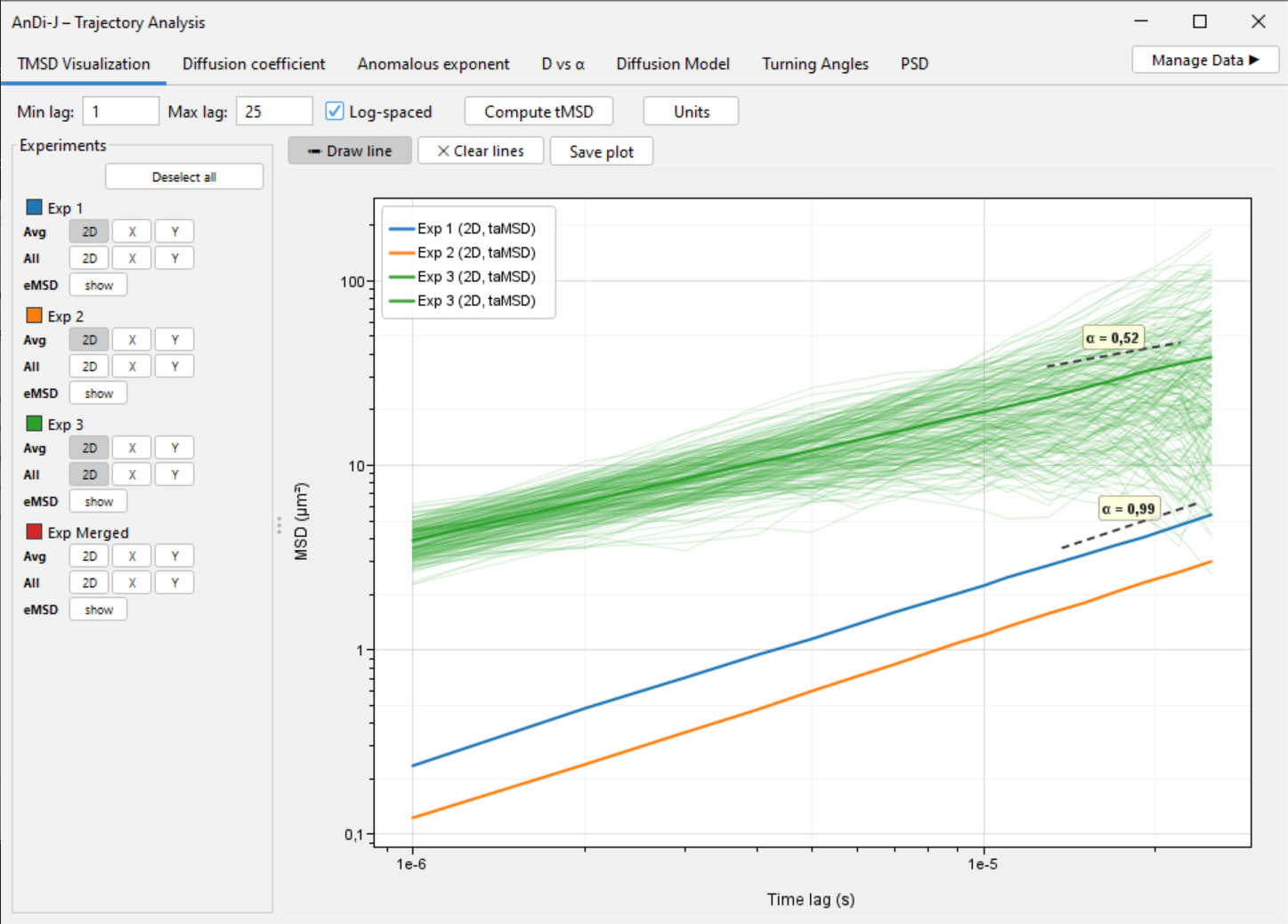
tMSD Visualization tab with the eMSD overlay.
Diffusion coefficient
Estimates the diffusion coefficient D per trajectory from a linear fit of the tMSD vs lag-time (mirroring andi_datasets’ get_diff_coeff), shown as a histogram. Dashed lines show the mean over the experiment.
You can configure the time lags at will, depending on the conditions of your experiment. Three formats are accepted:
-
[min, max]— a fixed integer range. When the second value is an integer ≥ 1 and larger than the first, the fit uses every lag frommintomax, the same for all trajectories. Example:[1, 20]uses lags 1, 2, …, 20. -
[min, fraction]— a per-trajectory (adaptive) range. When the second value is between 0 and 1, it is read as a fraction of each trajectory’s length: the fit uses lags fromminup tofloor(fraction × length)(with a small lower bound of 4), computed independently for every trajectory, so short trajectories automatically get a shorter maximum lag. Example (and default):[1, 0.1]fits from lag 1 up to 10 % of each trajectory’s length. -
[t₁, t₂, t₃, …]— an explicit list. Any comma-separated list of positive integers is used verbatim as the set of lags for every trajectory. Example:[1, 2, 4, 8].
For guidance on what to choose, we recommend:
- Kepten, E., Weron, A., Sikora, G., Burnecki, K., & Garini, Y. (2015). Guidelines for the fitting of anomalous diffusion mean square displacement graphs from single particle tracking experiments. PLOS ONE, 10(2), e0117722.
You can analyse the 2D / X / Y components independently, which makes it possible, for instance, to detect anisotropic diffusion in your experiment. The values shown when the window opens use the default time lags [1,2]. The histogram toolbar has Normalize (%) and Log D axis; the latter shows D on a logarithmic axis with log-spaced bins (values D ≤ 0 are left out).
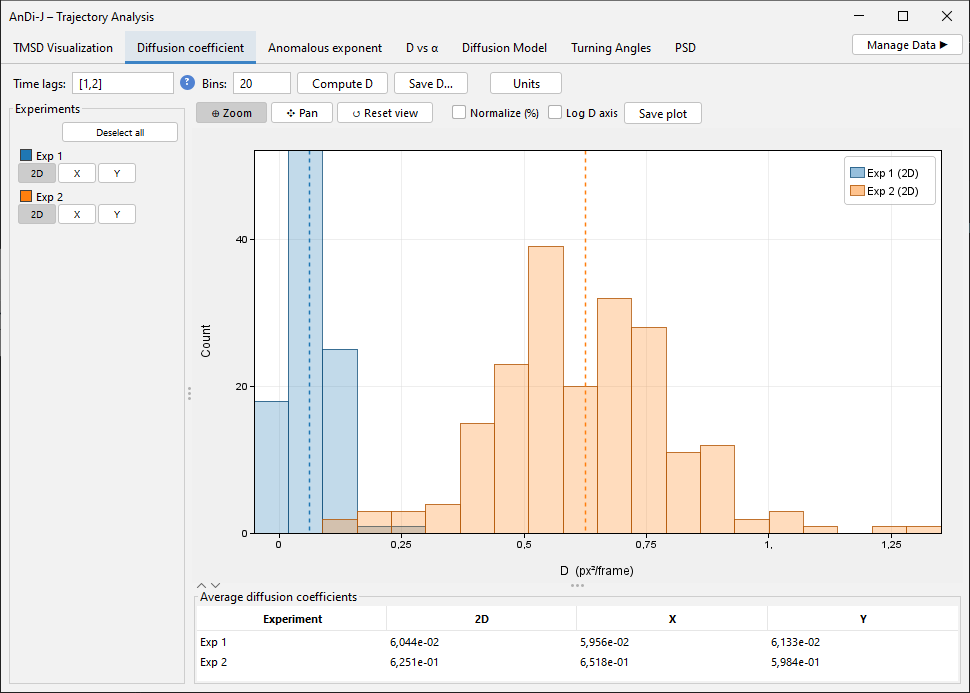
Diffusion coefficient histogram.
Anomalous exponent
Estimates the anomalous exponent α with two interchangeable methods, selected from the Method drop-down:
TMSD — log–log fit of the tMSD curve (click to expand)
The anomalous exponent is obtained from a log–log fit of the time-averaged MSD (tMSD) versus the time lag Δ: α is the slope of log(tMSD) vs log(Δ). The Time lags field controls which lags enter that fit, and follows the same format as for D above.
How to choose. The key trade-off is statistics versus bias. At a lag Δ, the tMSD of a trajectory of length L is averaged over only L − Δ time origins, so large lags are noisy and can distort the slope; conversely you need enough points to define a slope reliably.
- Keep the maximum lag small relative to the trajectory length (roughly 10–25 %). The adaptive form
[1, 0.1](the default) is the safest general choice because it scales automatically with each trajectory — recommended when your dataset mixes different lengths. - Use a fixed
[min, max]only when all trajectories are of similar length and you want identical lags across them (e.g. for reproducibility). - Start at lag 1 for clean/simulated data. For experimental data affected by localization noise or motion blur at the shortest lag, starting at 2 (e.g.
[2, 0.1]) can give a cleaner slope. - Make sure the range spans at least a few lags (two is the minimum for a slope, but more gives a more stable fit).
- Because the fit is in log–log space, the frame interval does not affect α (it only rescales the lag axis); the interval matters for D, not for the exponent.
ML — deep-learning prediction (click to expand)
Uses a neural network to predict the exponent, typically a much more accurate technique than the tMSD approach (as shown in the 1st AnDi Challenge). Two options:
- Default — uses a pre-trained model that outperforms every method of the 1st AnDi Challenge on 2D trajectories (see ML models). This model internally also predicts the diffusion model, so running it automatically populates the Diffusion Model tab (see below).
- Load — allows you to load a custom α predictor. See ML models for details.
Once the exponent is calculated, a histogram of the exponent per trajectory is shown. The table below it reports the exponent computed from an ensemble MSD fit, the most robust method if the dataset is homogeneous. If ML is used to predict α, a new column appears with the average over those predictions.
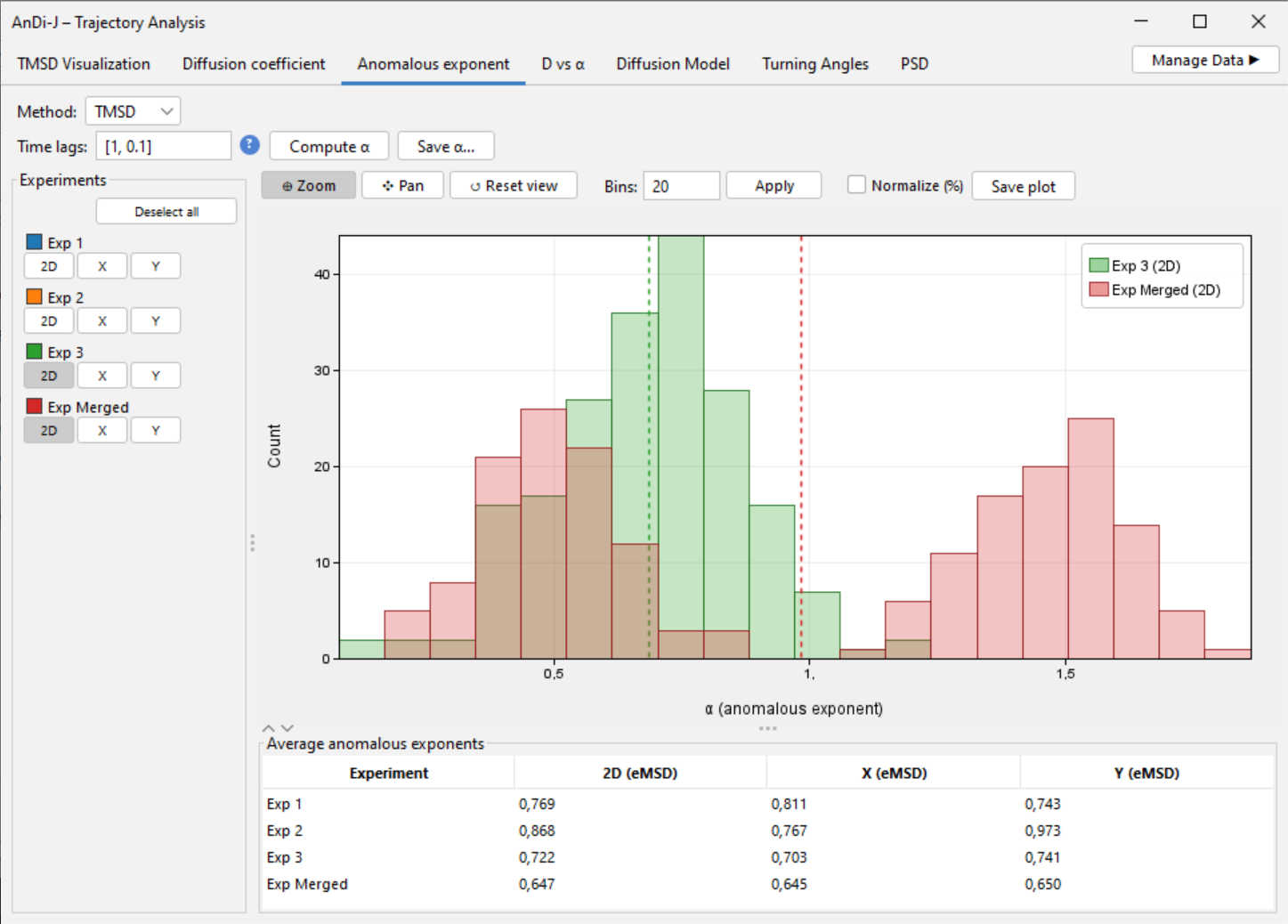
Anomalous exponent histogram, computed with the ML method.
D vs α
A scatter of one point per trajectory in the D–α plane, or a density of the same points. Both quantities are taken from the last computation in their respective tabs; change the parameters or methods there and this tab updates too.
The dropdown at the start of the toolbar chooses the view:
- Scatter — one point per trajectory, with the Select tool for population tagging (below).
- Density — a 2-D histogram of the same points, overlaid per experiment and tagged population in their colours, as in the Trajectory Segmentation D vs α tab, with α bins, D bins and Log count scale; the legend gives the number of trajectories of each. Selection and tagging are not available in this view; tagged populations appear as their own colour.
Features:
- Marginal KDEs — the plots along the top and right edges show a kernel density estimate of the population for α and D, respectively.
- Population tagging — in Select mode, circle (lasso) a cluster of points (see blue area in the figure below), type a name in Population tag: and click Tag population. The enclosed trajectories are recoloured to a shade of their parent colour and added as a new dataset to the Turning Angles and Diffusion Model tabs. A management table below the plot lists each population (tag, source datasets, colour — click the colour to change it). Click Save… in the Save column to export the population’s trajectories as a
csvin the input format (TRACK_ID, POSITION_X, POSITION_Y, POSITION_T, FRAME), plus anEXPERIMENTcolumn naming the experiment each trajectory comes from. The file can be loaded again in the Data Manager, which ignores the extra column; with a calibration, positions are written in μm andPOSITION_Tin seconds, so the file loads back calibrated.TRACK_IDkeeps the trajectory’s id when the population comes from one experiment and is renumbered from 0 when it mixes several, so ids stay unique; commas in experiment names are written as semicolons. - Plot manipulation — Log D axis toggle, rubber-band Zoom, Pan, Reset view, in both views.
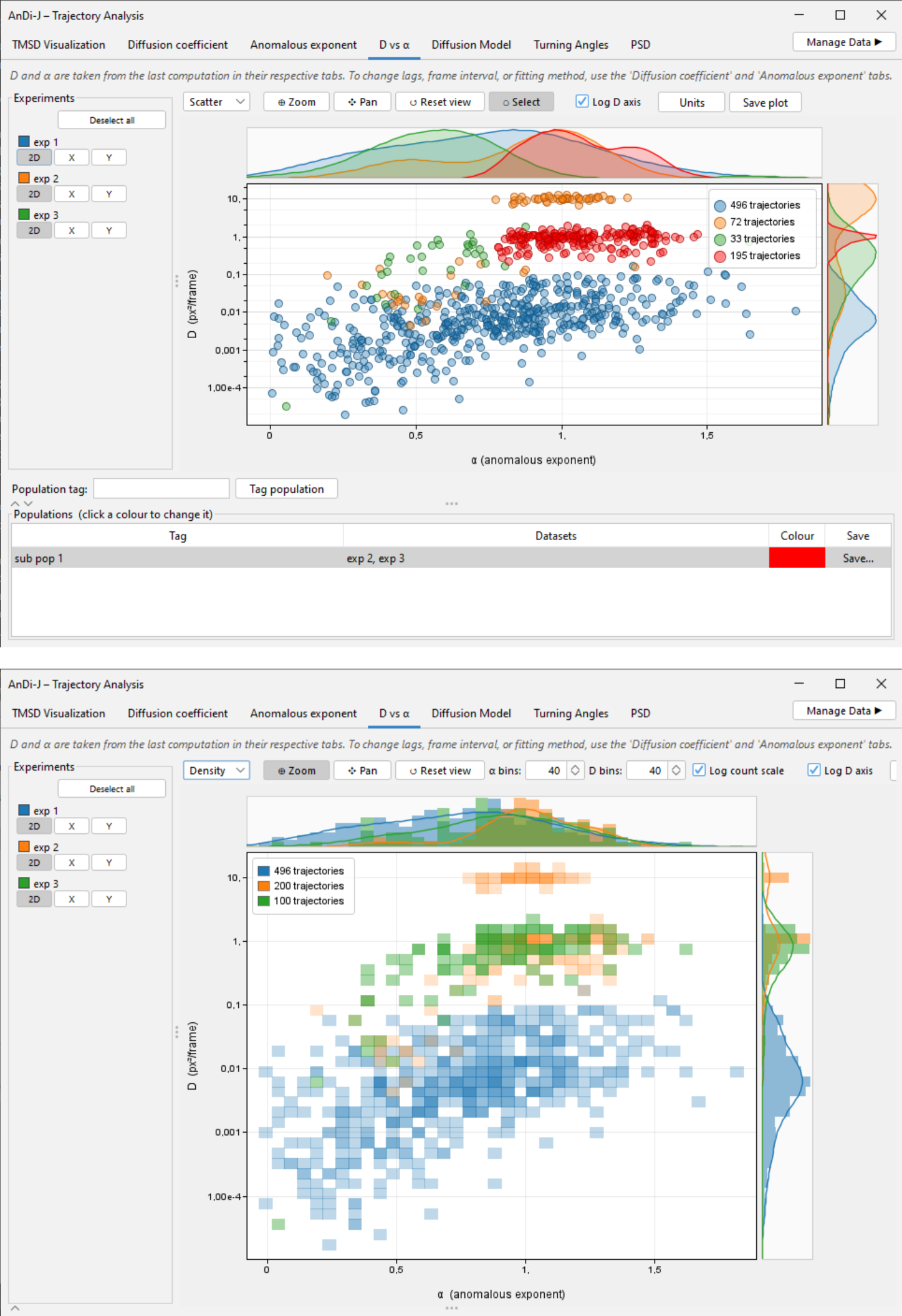
D vs α in Scatter view, with marginal KDEs and a tagged population (top), and in Density view (bottom).
Diffusion Model
Classifies each trajectory into one of the five canonical anomalous-diffusion models: ATTM, CTRW, FBM, LW, SBM (see Muñoz-Gil et al. (2021) for more details). The predictions are done through an ML model, and shown as a grouped bar chart of the percentage of trajectories per experiment assigned to each model.
If a population was selected in the D vs α plot, it will appear as its own experiment in this tab.
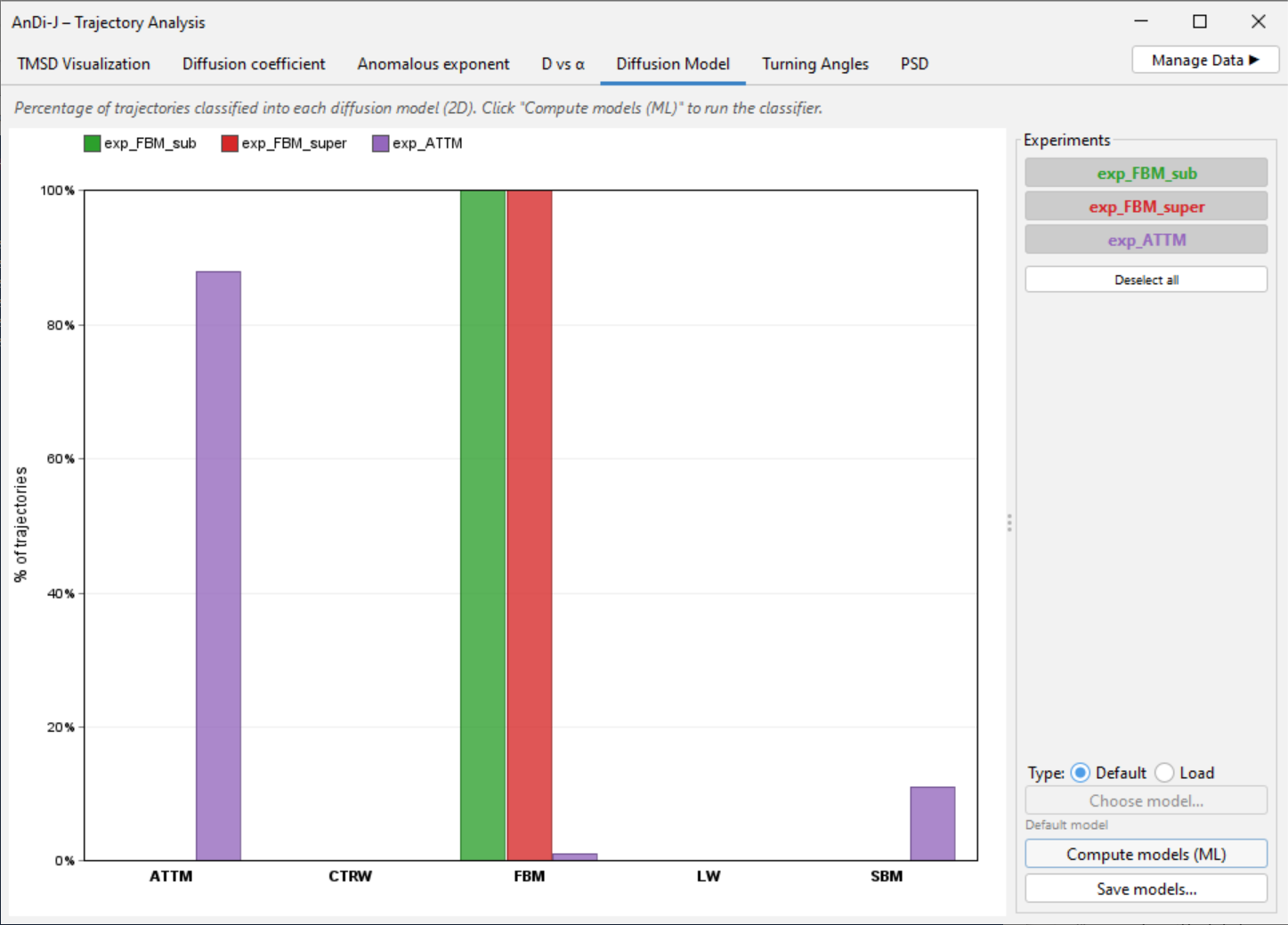
Diffusion Model classification bar chart.
Turning Angles
A polar rose histogram of turning angles between successive displacement vectors, pooled per experiment and normalised to a fraction, so that experiments with different track counts are comparable.
If a population was selected in the D vs α plot, it will appear as its own experiment in this tab. In the example below, population_normal_fast is a population containing a few trajectories from exp_FBM_normal.
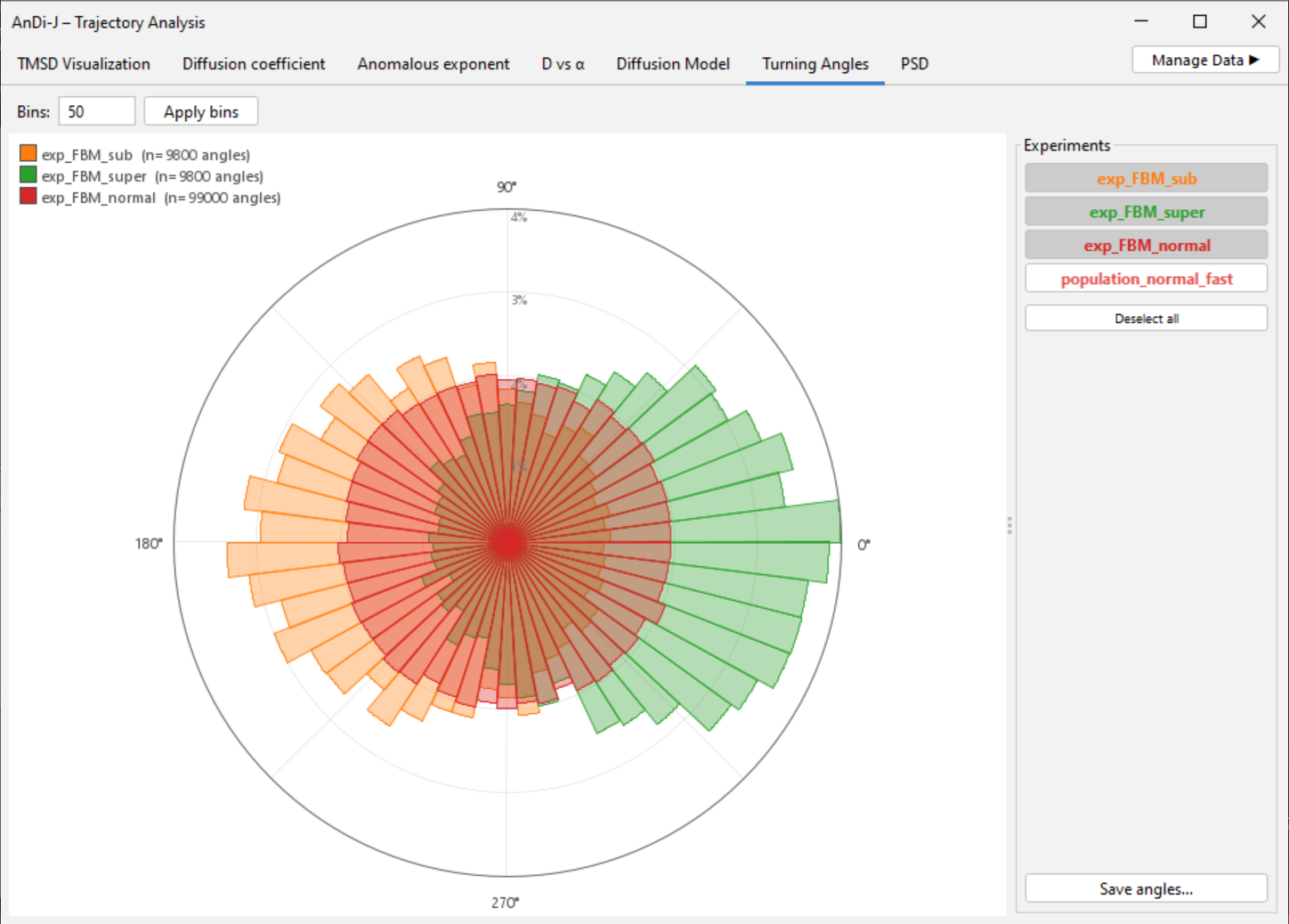
Turning Angles polar rose.
PSD
Ensemble-averaged power spectral density of the trajectories, based on andi_datasets.analysis.psd (which wraps scipy.signal.periodogram with its defaults: unit sampling, boxcar window, constant detrend, one-sided, density scaling).
- Each shown periodogram is averaged over all trajectories of an experiment on a shared log-frequency grid (from
1/max-lengthup to the Nyquist frequency 0.5). Only the global average is shown — no per-track curves — with independent 2D / X / Y selectors per experiment. - Freq. points sets the number of frequency bins; Log–log toggles the axes.
- A Draw line tool (as in the tMSD tab) reports the slope of a reference line — useful since the PSD of an anomalous process scales as a power law in frequency (the spectral slope is related to the anomalous exponent).
To learn about the PSD for anomalous diffusion analysis, we recommend reading the following publications:
- Krapf, D., et al. (2018). Power spectral density of a single Brownian trajectory: what one can and cannot learn from it. New Journal of Physics, 20(2), 023029.
- Krapf, D., Lukat, N., Marinari, E., Metzler, R., Oshanin, G., Selhuber-Unkel, C., … & Xu, X. (2019). Spectral content of a single non-Brownian trajectory. Physical Review X, 9(1), 011019.
- Sposini, V., Krapf, D., Marinari, E., Sunyer, R., Ritort, F., Taheri, F., … & Oshanin, G. (2022). Towards a robust criterion of anomalous diffusion. Communications Physics, 5(1), 305.
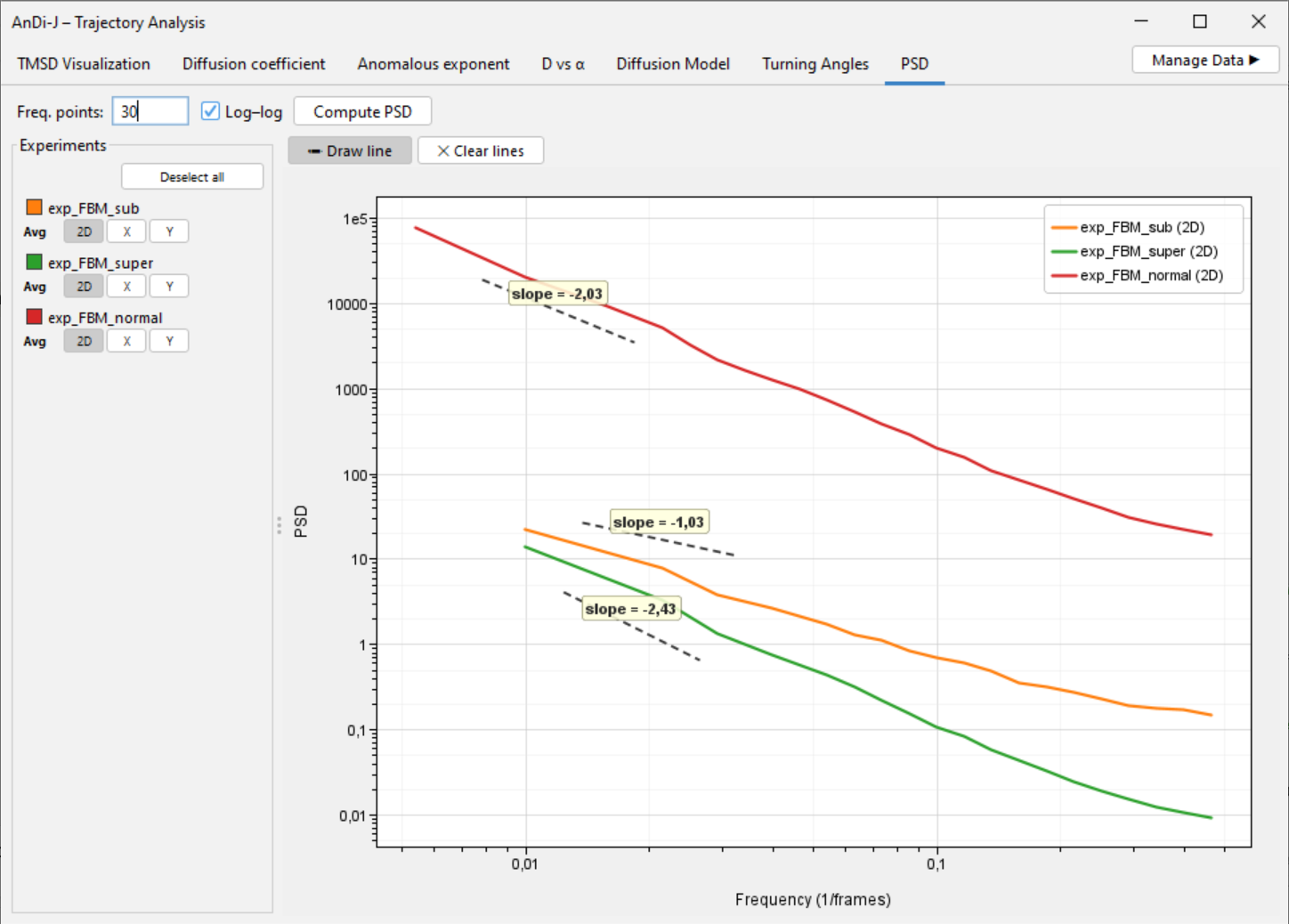
PSD tab with a drawn slope line.