

AnDi-J takes as input .csv files containing the trajectories of a given experiment. To ease integration with existing tools, the expected .csv must follow the standard layout of a TrackMate output: a header row, three further description/units rows, then one row per spot. The required columns are:
| Column | Meaning |
|---|---|
TRACK_ID |
trajectory identifier |
POSITION_X, POSITION_Y |
spot coordinates |
FRAME |
frame index |
POSITION_T |
time (optional; with its unit, gives the frame interval, see Units) |
Spots are grouped by TRACK_ID and sorted by frame; gaps in FRAME are handled where relevant (e.g. MSD and eMSD lookups are gap-aware).

Generating test data. The pythons_helpers folder of the repository provides scripts that use Python and the andi_datasets library to produce example test csv files.
Data Manager
The Data Manager is an independent window that lets you select the data to be processed by the plugin. Trajectory Analysis and Trajectory Segmentation have a similar Data Manager, although each opens in its own window.
Loading trajectories
This part of the manager is the same for both Trajectory Analysis and Trajectory Segmentation.
- Load as Separate / Merge — whether the chosen files are merged into a single experiment for analysis or loaded as separate ones. Only applies if more than one file is selected.
- Choose Files… — choose the CSV files (multi-select allowed).
- Tag — the name by which the experiment will be tagged in the analysis. If left blank, the tag is set to the file name. If several files are merged without a tag, the experiment is named
Exp N. - Min. length / Max. length — per-file trajectory-length filters: trajectories with fewer frames than Min. length are left out; longer than Max. length are cut to their first Max. length frames. Blank means no filter; setting both to N keeps exactly N frames of every trajectory with at least N.
- Load Data — loads the files into the table.
- The table shows, per file: colour, tag, file name, Length range (shortest – longest trajectory in the file), Min. length, Max. length, Trajectories (kept by Min. length / in the file, updated as you edit) and the units. Tag, Min. length, Max. length and the units are editable.
- Perform Analysis — assembles the experiments and opens the analysis window. For Trajectory Analysis this is almost instantaneous. For Trajectory Segmentation, the ML models that predict the per-frame properties are run at this point, so it takes longer; see Selecting the segmentation model below for details.
The Data Manager can be accessed at any time during analysis, allowing you to add or remove experiments at will.
Units
The fourth header row of a TrackMate export holds the unit of each column, e.g. (micron) for the positions and (sec) for POSITION_T, or (pixel) and (frame) when the image was not calibrated. The Data Manager reads them into two editable columns of the table:
- Space unit (μm) — the size of one position unit in μm: 1 for positions in μm, the pixel size for positions in pixels.
- Frame interval (μs) — the time between frames in μs, from
POSITION_Tand its unit.
An empty cell means unknown; double-click it to fill in or correct the value. When the experiments have these values, the Units button of the analysis tabs shows the results in physical units (nm to m, ns to s); without them, the analysis is in pixels and frames.
All experiments must be either calibrated or not (separately for space and time), and files merged into one experiment must share their values: otherwise Perform Analysis shows a warning and does not run, since values in μm and in pixels, or in seconds and in frames, cannot be compared. α, turning angles, diffusion models and diffusive states do not depend on the units.
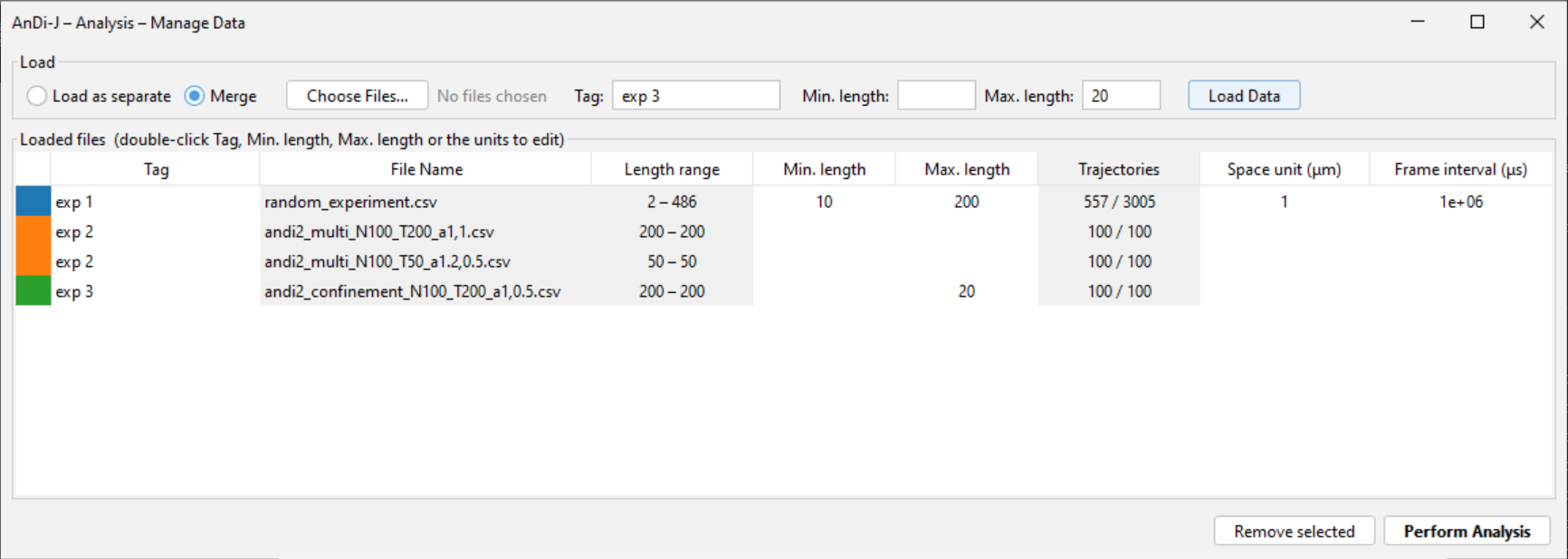
Data Manager. Four test files loaded into three experiments. exp 1 keeps the trajectories of at least 10 frames and cuts them to 200 (557 of its 3005 trajectories are kept); the two files tagged exp 2 are merged into one experiment; exp 3 cuts its trajectories to 20 frames.
Selecting the segmentation model
This part of the manager exists only in Trajectory Segmentation. By default a pre-trained model is already selected, so the analysis can be run as is.
- You can also load your own models for the predictions, either one model producing all outputs (Combined model) or one model per output (Per output). For a combined model, the Model segments checkbox (ticked by default) uses the segments the model reports in its
seg_*outputs; unticked, the plugin builds the segments from the change points. See Custom models for Trajectory Segmentation for the input/output contract your model must follow.
As a reference for runtime, the bundled default model processes 500 trajectories of 200 frames in about 90 s on an 8-core CPU (no GPU), running 4 trajectories in parallel. With a CUDA GPU and the GPU build of ONNX Runtime, inference runs on the GPU (see Installation). The bundled model averages its predictions over 8 rotations and reflections of each trajectory; see ML models.
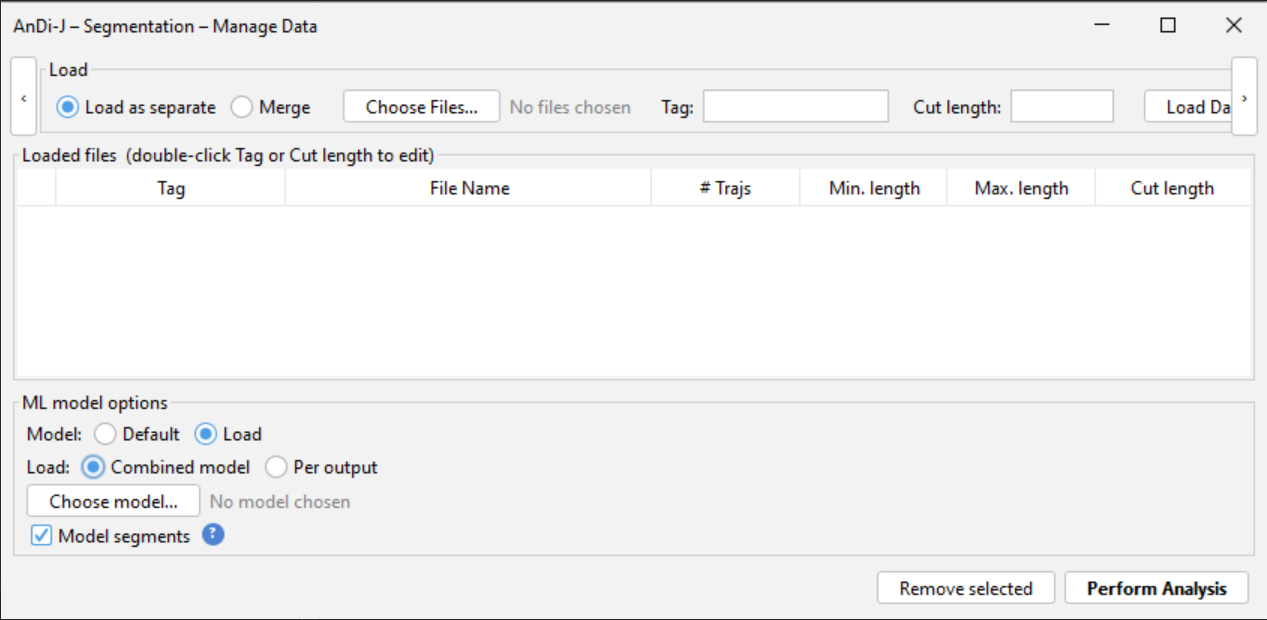
ML model options in the Trajectory Segmentation Data Manager.